Responsive Design Mistakes: 12 Critical Errors That Hurt UX and SEO

Your website looks perfect on your desktop. Then a client opens it on their smartphone and everything breaks. This guide breaks down the most common responsive web design mistakes and exactly how to fix them.

Responsive Design Mistakes
Table of Contents

Your website looks perfect on your desktop. Then a client opens it on their smartphone and everything breaks. The navigation disappears, images overflow, even text becomes unreadable. 

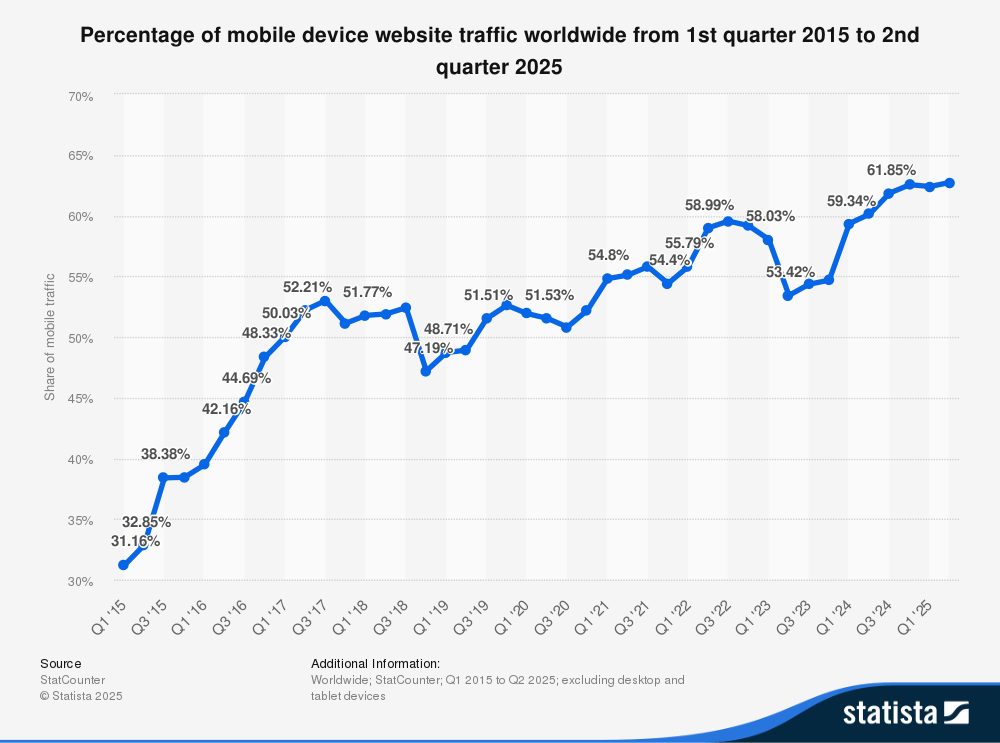
Sound familiar? Poor mobile design doesn't just frustrate users; it tanks your search engine rankings and drives potential customers straight to competitors. With over 60% of website traffic now coming from mobile devices, responsive design can be business killers.

This guide breaks down the most common responsive web design mistakes and exactly how to fix them, so you can deliver a seamless user experience across all devices without the trial-and-error headaches.

Responsive Design Mistakes

  • Ignoring mobile-first approach → Start with mobile layouts, then scale up instead of cramming desktop designs onto small screens.
  • Fixed-width layouts and small touch targets → Use fluid grids with percentage-based widths and maintain minimum 44x44 pixel clickable areas for usability.
  • Unoptimized images and poor performance → Implement srcset, compression, and lazy-loading to prevent slow load times that hurt SEO and user experience.
  • Hiding content or clunky navigation → Prioritize content visibility and simplify menu patterns instead of hiding information or creating inaccessible navigation on mobile.
  • Skipping real device testing → Test on actual smartphones and tablets across different browsers, not just desktop emulators.

Core Principles of Good Responsive Design

Before diving into mistakes, understand what makes responsive web design work.

Mobile-first vs desktop-first approach: Mobile-first means designing for the smallest screen first, then progressively enhancing for larger devices.

Desktop-first does the opposite but often results in bloated mobile experiences. The mobile-first approach forces you to prioritize content and functionality from the start.

Fluid grids, flexible images, and media queries: Responsive websites use percentage-based grids that adapt to screen size, images that scale proportionally, and CSS media queries that apply different styles at specific breakpoints.

These three pillars ensure your design can lead to consistent experiences regardless of the device.

Performance, accessibility, and content prioritization: Good web design balances aesthetics with speed, ensures users with disabilities can access content, and displays the most important information first on every screen size.

Common Responsive Design Mistakes

1. Ignoring Mobile-First Mindset

Why it happens: Many design experts still start with desktop design because it's familiar and easier to visualize full layouts. This backward approach creates bloated mobile sites.

The fix: Use a mobile-first approach by designing your smallest viewport first. Write your base CSS for mobile, then use min-width media queries to enhance layouts for larger devices. This ensures mobile users get optimized experiences, not stripped-down desktop versions.

2. Using Fixed-Width Layouts or Elements

Symptoms: Horizontal scrolling, cut-off content, or awkwardly small text on mobile devices.

The fix: Replace fixed pixel widths with percentages, CSS Grid, or Flexbox. Set max-width: 100% on images and use width: 100% with container constraints. Fluid layouts automatically adjust, providing the best possible experience across all platforms.

3. Poor Breakpoint Strategy

Over-reliance on device-specific breakpoints: One of the biggest mistakes is designing breakpoints around popular devices (iPhone, iPad). New devices constantly emerge, making this approach obsolete quickly.

The fix: Design around content and context-driven breakpoints. Add breakpoints where your layout breaks, not where devices exist. Test in a new browser window and resize gradually. Don't forget to add breakpoints when content looks awkward.

4. Neglecting Touch Targets and Spacing

Accessibility and usability impacts: Small buttons and links frustrate users and exclude people with motor impairments. Poor mobile usability directly impacts user engagement and conversion rates.

The fix: Maintain minimum 44x44 pixel touch targets with adequate spacing. Ensure buttons, navigation links, and interactive elements are user-friendly and easy to tap without accidentally hitting adjacent elements.

5. Serving Large, Unoptimized Images

Performance issues: Serving desktop-sized images to mobile phones wastes data and causes slow load times. This damages search engine rankings and user experience.

The fix: Implement responsive images using srcset and sizes attributes. Compress images aggressively for web.

Consider using modern formats like WebP. Art direction using <picture> elements lets you serve different crops for different screen sizes, ensuring your website looks great everywhere.

6. Relying Solely on Device Detection

Why device sniffing fails: Server-side device detection can't keep pace with the thousands of devices released annually. It creates maintenance nightmares and often serves wrong layouts.

The fix: Use feature detection and responsive techniques like media queries. Let CSS and JavaScript detect capabilities (touch support, screen width) rather than trying to identify specific devices. This future-proofs your design.

Check Responsive Design

Test your website across multiple screen sizes and devices to catch responsive design mistakes instantly.

Check Site

7. Hidden Content or Poor Content Prioritization

Hiding important information: Hiding content with display: none on small viewports seems convenient but hurts both UX design and SEO. Users miss critical information and search engine crawlers may devalue hidden content.

The fix: Prioritize content rather than hide it. Use progressive disclosure to manage space while keeping content accessible. Ensure to use layout changes to emphasize what matters most on each screen size.

8. Poorly Implemented Navigation for Small Screens

Common mistakes: Hamburger menus that don't work, tiny navigation links, or complex mega-menus crammed onto mobile create poor user experience. Testing your mobile design should always include navigation flows.

The fix: Simplify navigation patterns. Use accessible hamburger menus with proper ARIA labels, consider priority+ navigation that shows key items inline, or implement bottom navigation for mobile apps. Make menu items large enough and ensure keyboard access for all interactive elements.

Mobile traffic

9. Inadequate Typography Scaling and Line Lengths

Readability problems: Fixed font sizes force users to zoom and scroll horizontally. Long line lengths on tablets reduce readability and comprehension.

The fix: Use responsive type with rem units or the CSS clamp() function for fluid typography. Maintain optimal line lengths (45-75 characters) across breakpoints. Scale heading sizes proportionally to maintain visual hierarchy on different devices.

10. Ignoring Performance and Render-Blocking Assets

Speed impacts: Slow load times hurt mobile users on cellular networks and damage search engine rankings. Google's Core Web Vitals directly measure these performance factors.

The fix: Defer or async non-critical JavaScript, inline critical CSS, and lazy-load images below the fold. Minimize CSS and JavaScript files. Every second of load time impacts conversion rates, so optimize relentlessly.

11. Overcomplicating Interactive Components

Complex animations and heavy JS: Elaborate hover effects, parallax scrolling, and animation-heavy interfaces often fail on mobile or cause performance issues.

The fix: Practice progressive enhancement. Build core functionality with HTML and CSS first, then enhance with JavaScript. Simplify interactions for touch as what works with a mouse cursor doesn't always translate. Test your site on mid-range smartphones, not just flagships.

12. Not Testing Across Real Devices and Contexts

Limitations of emulators: Browser developer tools are useful but don't replicate real device performance, touch interactions, or various browsers accurately.

The fix: Build a testing matrix covering popular mobile phones, tablets, and browsers. Use real device labs or services like BrowserStack. Test on different network speeds since your design can lead to frustration if it only works on WiFi. Include cross-browser testing to catch browser-specific issues.

Tools and Resources

Start your testing with our responsive website checker at pacgie.com/responsive-checker to quickly identify layout issues across common breakpoints.

Browser dev tools: Chrome DevTools, Firefox Responsive Design Mode, and Safari's device simulator help test layouts quickly.

Performance tools: Google Lighthouse and WebPageTest measure load times and provide optimization recommendations.

Image optimization: Squoosh, imgix, and Cloudinary help compress and serve responsive images efficiently.

Accessibility testing: Axe DevTools and WAVE identify barriers for users with disabilities.

CSS frameworks: Bootstrap and Tailwind provide responsive utilities, though understanding CSS Grid and Flexbox fundamentals prevents framework dependence.

Checklist: How to Audit for Responsive Design Mistakes

Pre-launch checklist:

  • Test layouts at common breakpoints (320px, 768px, 1024px, 1440px+)
  • Verify touch targets meet 44px minimum
  • Validate image optimization and srcset implementation
  • Run Lighthouse performance audit
  • Complete accessibility scan with automated tools
  • Test navigation and forms on touch devices

Ongoing monitoring:

  • Track mobile vs desktop users in analytics
  • Monitor bounce rates by device type
  • Set up error reporting for JavaScript failures
  • A/B test mobile layout variations
  • Review site speed metrics monthly

Best Practices and Recommendations

Start mobile-first: Design for content hierarchy from the smallest screen up. This forces you to prioritize what matters most and improve the user experience for the majority of website traffic.

Use fluid layouts and flexible media: Percentage-based grids, flexible images, and meaningful breakpoints create experiences that work across all devices naturally.

Optimize for performance and accessibility: Speed and accessibility are fundamental to professional web design and directly impact search engine rankings.

Test frequently: Regular testing on multiple devices, networks, and orientations catches issues before users encounter them. Make testing your mobile design part of your workflow, not an afterthought.

Comparisons

Responsive Design vs Adaptive Design

Responsive design uses fluid grids and flexible layouts that continuously adjust to any screen size. Adaptive design serves distinct layouts for specific breakpoints.

When to choose responsive: For most projects. It's more flexible, requires less maintenance, and handles the unpredictable variety of devices better.

When adaptive may be appropriate: For applications requiring drastically different interfaces between mobile and desktop, or when retrofitting legacy sites where full responsiveness isn't feasible.

Mobile-First vs Desktop-First Workflows

Mobile-first forces constraint-based thinking and content prioritization. Desktop-first often leads to feature bloat that gets awkwardly condensed for mobile. The mobile-first approach typically results in cleaner code and better performance.

Server-Side vs Client-Side Image Adaptation

Server-side solutions (responsive image services) can optimize images based on device detection but require infrastructure. Client-side approaches (srcset, picture elements) put browsers in control and work across hosting environments. Most modern websites should implement client-side responsive images with proper markup.

FAQ — Frequently Asked Questions

What are the most critical responsive design mistakes to avoid? The biggest mistakes are ignoring mobile-first design, using fixed-width layouts, and failing to optimize images. 

How do responsive design mistakes affect SEO? Google uses mobile-first indexing, meaning it primarily evaluates your mobile site for rankings. Slow load times, poor usability, and hidden content all damage your visibility. 

Are responsive design frameworks enough to prevent mistakes? Frameworks like Bootstrap provide helpful utilities but don't guarantee good responsive design. You still need to understand breakpoint strategy, image optimization, and performance best practices. Frameworks solve layout problems but can't fix poor content prioritization or oversized images.

How often should I test responsive behavior? Test during development for every significant feature or layout change. After launch, conduct quarterly audits and monitor analytics for device-specific issues. Set up automated testing where possible to catch regressions quickly.

How to prioritize fixes when working with legacy sites? Start with issues causing the most user friction: navigation problems, unreadable text, and horizontal scrolling. Next, tackle performance issues like unoptimized images. Finally, refine breakpoints and polish interactions. Use analytics to identify which pages get the most mobile traffic and prioritize those.

What metrics indicate responsive design issues? High mobile bounce rates compared to desktop, low mobile conversion rates, increased error rates on mobile, slow page speed scores (especially mobile), and high exit rates from key pages on mobile devices all signal problems. Compare desktop users and mobile users to spot disparities.

Conclusion

Avoiding common mistakes in responsive web design isn't about perfection—it's about putting users first across every device. The mistakes we've covered all share one thing: they prioritize developer convenience over user needs.

Start by auditing your current site with our responsive checker tool, then tackle the highest-impact issues first. Focus on mobile-first layouts, optimize images, simplify navigation, and test on actual devices. Small improvements compound quickly.

Remember: responsive design isn't a one-time task. As new devices emerge and user expectations evolve, continuously test, measure, and refine. Your website looks different on every device.